Quality options
HD, Full HD and 4K where the source and device support them.

Compare personal subscriptions and reseller-panel access, choose a compatible player, test your real device for 24 hours, and use practical setup guides written for the way people actually watch.
Large catalogues change. Use these common search references as a checklist, then verify individual categories and sources during the current trial.
Names above identify categories customers commonly ask support to verify. They are trademarks of their respective owners, do not imply affiliation, and are not a promise of current availability. Confirm every essential channel, event or title during the trial.
The most important distinctions are visible before you choose a plan: the subscription, player, device and network each control a different part of the experience.
| Area | What is provided | What to verify |
|---|---|---|
| 24-hour trial | Temporary supported access for compatibility testing. | Your final device, selected player, network and required categories. |
| Subscription | 1, 3, 6 and 12-month periods priced in USD. | Total, renewal terms, allowed connections and player requirements. |
| Picture options | SD, HD, Full HD and 4K where the individual source supports them. | Device decoding, display capability and sustained bandwidth. |
| Apps | Dino Pro, Dino IBO and compatible third-party player guidance. | Store availability, login method and any separate player fee. |
| Reseller panel | 60, 120, 300 and 600-credit packages for partner workflows. | Current duration mapping, responsibilities and commercial terms. |
Dino IPTV supplies supported service access. The player controls menus, search, favourites, guide layout and playback controls. Your hardware and network determine which apps, codecs and quality levels work reliably.

Every tool depends on the current source, selected player and device. The trial gives you a direct way to check the complete setup.
HD, Full HD and 4K where the source and device support them.
Browse schedules in eligible groups and supported players.
Replay past programmes only on sources that include catch-up.
Find categories, movies and series faster in a compatible player.
Save commonly used categories or sources at player level.
Browse regional and language groups in the current catalogue.
Select available tracks inside supported players and titles.
Keep credentials and device keys out of public messages.
Every image has a descriptive filename, visible caption, fixed dimensions and relevant alternative text for accessibility and image search.


Every amount is the complete displayed USD total for the selected period. Complete the trial and review the written terms before choosing a longer commitment.
Reseller access is designed for partners who need to create supported customer lines, organise periods and track renewals. Confirm the current credit-to-duration mapping before setting your own retail prices.

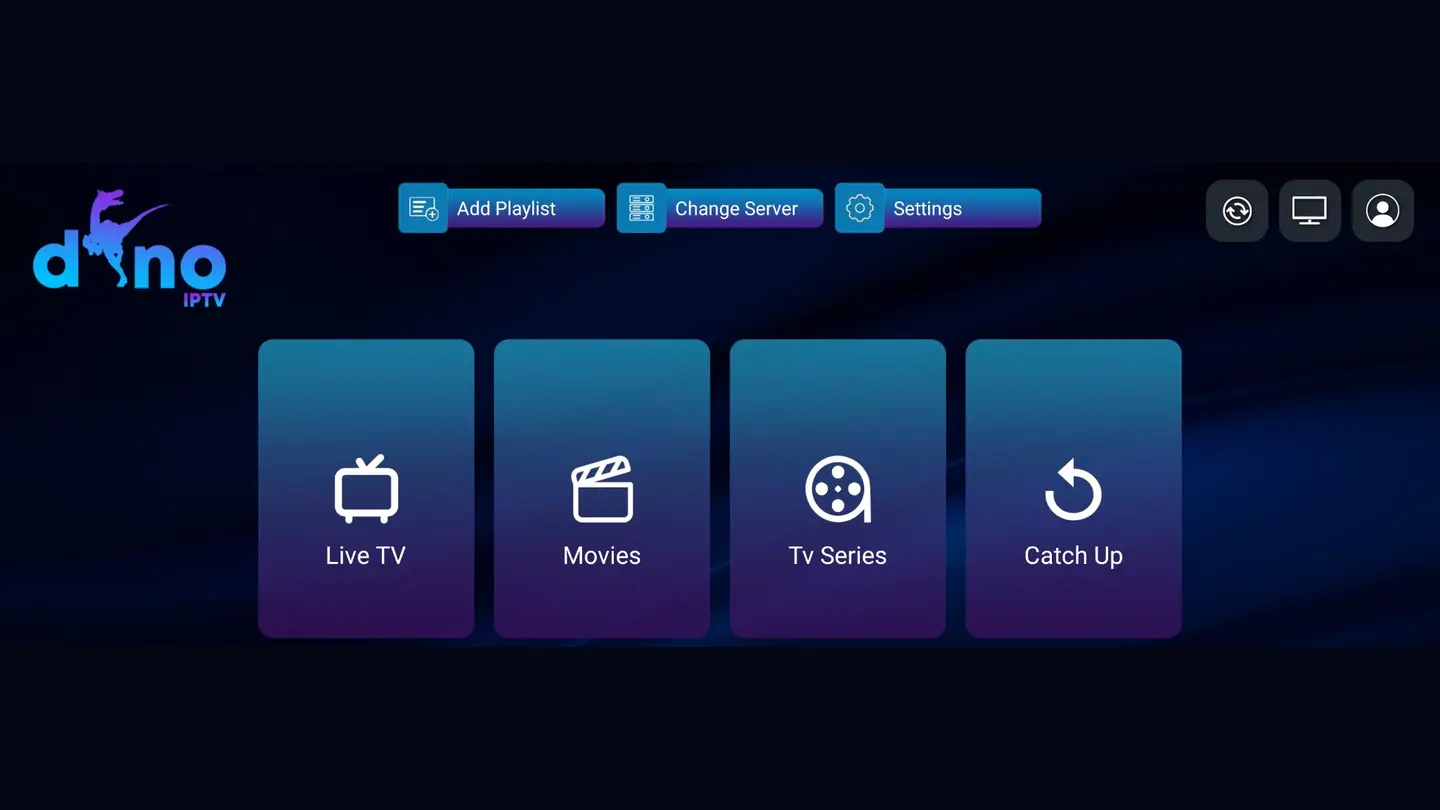
The supplied Dino Pro and Dino IBO screenshots show where to find device identifiers, add a playlist and open live TV, movies, series and catch-up sections.

Open Add Playlist and use the supported activation route. Device identifiers are intentionally excluded from this public image.

Follow the in-app instruction, add the supported playlist privately and reload categories after the account is linked.
The Dino interface separates live television, movies, series and catch-up tools into remote-friendly sections.

Choose the app supported by your device and confirm activation requirements before purchasing any third-party player licence.
Identify the exact television, streaming box, phone, tablet or computer.
Confirm app-store availability and the account login method it supports.
Test the same device, player and network you intend to keep using.
Review the total, terms and connection needs after the trial works.
These are practical test scenarios, not fabricated testimonials.
Read the full FAQ for more device, app, billing, reseller and troubleshooting detail.
Dino IPTV is an internet-delivered television and on-demand subscription intended for compatible IPTV players. The subscription supplies supported account access; the selected player supplies the interface used to browse and play available categories.
A 24-hour trial is available for compatibility testing. Use the same device, player and network you expect to use later, and check the categories and playback conditions that matter to you.
Setup guidance covers major Smart TV platforms, Amazon Fire TV, Android TV, Google TV, phones, tablets, Windows, macOS, MAG, Formuler and supported Enigma2 receivers. App availability varies by model, operating system and app-store region.
No. Resolution depends on the individual source, the current catalogue, your player, device decoding capability, display and connection. HD and Full HD are more widely available; verify essential quality options during the trial.
Stable speed matters more than a peak test. As a practical starting point, allow around 10 Mbps for HD, 15–25 Mbps for Full HD and 25 Mbps or more for 4K, with extra headroom for other devices. These are planning figures, not guarantees.
The subscription and player app are separate components. Some apps are free and others may charge an activation or licence fee set by the app developer. Confirm the supported login method and any player fee before setup.
You can usually install a compatible player on multiple devices, but simultaneous viewing depends on the number of connections included with the account. Confirm concurrent-use terms before ordering.
A reseller credit is panel balance used to create or extend customer lines under the current panel rules. The number of credits required for each duration must be confirmed with reseller support before you price customer plans.
Activation begins after the order and payment details are confirmed. Timing can vary with verification and setup requirements, so the checkout sends a structured request to support rather than displaying an unsupported instant-delivery promise.
EPG data can take time to download. Refresh the playlist and guide, confirm the player date and time, then restart the app. Some categories or sources may not supply programme-guide data.
Test another source, restart the player and router, reduce other network traffic, compare Ethernet with Wi-Fi and note the exact category and time. Send those details to support if the issue continues.
IPTV is a delivery technology. The legality of content access depends on licensing, the source, the service terms and local law. Use the service only for content you are authorised to access and review the responsible-use information for your location.
Device-specific instructions, network diagnostics and partner workflows written to solve one clear task per page.
Identify your Smart TV platform, choose a compatible player and test the complete login-to-playback path without exposing account details.
Read practical guide
Use a practical Samsung TV checklist for app availability, player activation, playlist refresh, remote navigation and network testing.
Read practical guide
Prepare an LG webOS television for a compatible IPTV player and troubleshoot activation, categories, EPG and remote-control behaviour.
Read practical guide
Install and test an IPTV player on Fire TV with enough storage, trusted app sources, private account entry and remote-friendly settings.
Read practical guide
Choose a TV-optimised Android IPTV player, add supported account details and verify hardware decoding, EPG and remote navigation.
Read practical guide
Compare tvOS player options and test login support, Siri Remote navigation, EPG, audio and playback on Apple TV.
Read practical guideThese standard outbound links are visible and contextual. Dino IPTV does not claim ownership, endorsement or control of the linked websites.
8K IPTV service reference. Review the current page, terms and claims independently.
Visit referenceTrex IPTV reference. Review the current page, terms and claims independently.
Visit reference8K IPTV guides. Review the current page, terms and claims independently.
Visit referenceStarshare IPTV information. Review the current page, terms and claims independently.
Visit referenceMegaOTT service guide. Review the current page, terms and claims independently.
Visit referenceLion OTT plans and reseller information. Review the current page, terms and claims independently.
Visit referenceUse the structured form to open a WhatsApp request without placing sensitive account information on the website.
A useful request separates the device, player, network and account symptoms. This prevents unnecessary resets and repeated questions.
Receive occasional guide updates about compatible devices, player changes, troubleshooting and reseller workflows. Your email app opens so the request stays transparent.